Running the nightly build of Neovim, version 0.12
And a very short introduction on how to use vim.pack
I've been using the nightly build of Neovim for several months now, as my daily driver, and I highly recommend it.
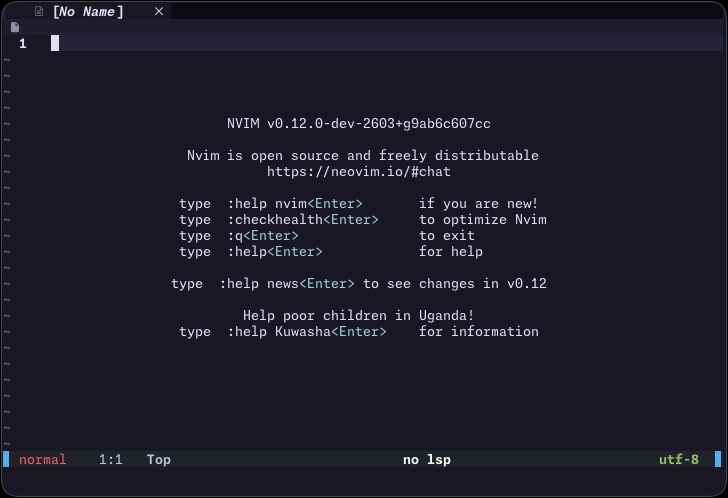
In case you are not aware: at the time of writing, the current stable release of Neovim is version v0.11.6. The nightly build allows you to run the in-development v0.12.
why would i want to do that
I think the 0.12 offers some really cool things:
- A native package manager,
vim.pack - A new LSP API
The native package manager: vim.pack
If you're unaware, he is the author of mini.nvim ->, a library of really cool plugins.
Adding a package looks like this:
vim.pack.add({
  { src = "https://github.com/nvim-lua/plenary.nvim" },
  { src = "https://github.com/nvim-treesitter/nvim-treesitter", version = "main" },
  { src = "https://github.com/folke/snacks.nvim" },
  { src = "https://github.com/rose-pine/neovim", name = "rose-pine" },
}
The docs: :h vim.pack.add() ->
Then, you can use the require().setup() flow that a package usually needs:
require("snacks").setup()
require("rose-pine").setup({ styles = { transparency = false } }) -- pass your opts here
Updating plugins
To update your plugins, you run
:lua vim.pack.update()
The docs: :h vim.pack.update() ->
When you run this, you will be taken to a confirmation buffer showing you the diffs / new commits for each plugin.
And to apply the changes, you can just write the buffer (:wq). If you quit :q, the changes will be discarded.
vim.pack supports LSP keymaps, such as vim.lsp.buf.code_action() (the
default mapping for this is gra), which allows you to do things such as update the
particular plugin your cursor is on, or delete an unused plugin. how cool is that? i think
buffer is really well thought-out, "editing" it feels naturalThis will update your pack lockfile, which you should keep version controlled in your config: $XDG_CONFIG_HOME/nvim/nvim-pack-lock.json (which usually lives under ~/.config/nvim/nvim-pack-lock.json.
Translating lazy.nvim imports
If you come from lazy.nvim land, translating imports usually follows the following
logic. Usually, a lazy.nvim import looks like this (see the which-key.nvim readme ->):
-- lazy.nvim package import
{
  "folke/which-key.nvim",
  event = "VeryLazy",
  opts = {
    delay = 500
  },
  keys = {
  {
    "<leader>?",
    function()
    require("which-key").show({ global = false })
    end,
    desc = "Buffer Local Keymaps (which-key)",
    },
  },
}
With vim.pack, you will decompose this import into its different basic units: install,
setup call, keys setup.
-- translated to vim.pack

-- install the package
vim.pack.add({ src = "https://github.com/folke/which-key.nvim" })

-- pass the opts here
require("which-key").setup({ delay = 500 })

-- install the keymaps manually
vim.keymap.set("n", "<leader>?", function()
  require("which-key").show({ global = false })
end, { desc = "Buffer Local Keymaps (which-key)" })
When it comes to lazy loading, if my understanding is correct, you kind of have to set it up manually. But I have never been bothered by my Neovim startup time, therefore I have not given too much thought about it.
The new LSP API
Enabling LSPs is really easy. You just do:
vim.lsp.enable({
  "ty",
  "ruff",
  "lua_ls",
  "ast_grep",
})
When you enable an LSP, Neovim will read its config from the lsp/ dir in your 'runtimepath' (the name of the server must match the
file. if you use ty, the config file must the ty.lua). Therefore, you
can do two things at the same time:
- use https://github.com/neovim/nvim-lspconfig ->, a data only repository which will install the LSP configs for a bunch of language servers
in your
'runtimepath' - define an
lsp/directory in your~/.nvim/config/and add your custom configs there
The docs: :h vim.lsp.enable() ->
but is it stable?
I have had almost no problems at all using the nightly build at my daily job. Once in a while there may be something a bit broken, but nothing bad. It's really easy to rollback to a previous commit if you really need (more in the next section), but there are nightly releases practically daily. Stability is a complete non-issue.
how to run the nightly build
I use a tool called bob ->, a neovim version manager.
After installation, usage is really simple:
bob use nightlyTo update the nightly build:
bob update nightlyYou'll be able to see your installed versions with bob list.
If you want to switch back to the stable v0.11, just use stable:
bob use stableSome concluding thoughts
To be clear, I am not saying that people should absolutely be migrating to vim.pack. As a plugin manager, lazy.nvim is great: loazy loading is
first and foremost (through the usage of ft, cmd, event,
...), allows you to specify brief plugin configs, where the logic is well localized (with the
ability to add config = {}, key = {},
etc.).
But it is really cool to be able to natively add plugins to your config. I think it shines if you're looking to simplify your config.
My config
If you want some inspiration, or if you're just curious, my config is available here: https://github.com/cyprienhm/dotfiles/blob/main/nvim/.config/nvim/init.lua.